
Level roles
A level role is a Discord role that Prosperity grants automatically when a member reaches a given level. They are the main reward mechanism in most servers: reach level 5 and get @Regular, reach level 25 and get @Veteran, and so on.
Adding a level role
Run this with the Manage Server permission:
/levelroles add role:@Regular level:5Two things happen:
- The role is registered against level 5 for your server.
- Every member who is already at level 5 or above is granted the role straight away, up to the next configured level role. Nobody has to level up again to catch up.
The level must be 1 or higher. You cannot register two roles at the same level, and you cannot register the same role twice.
Role position matters
Prosperity can only manage roles positioned below its own highest role. If a level role sits above Prosperity in the server's role list, Discord will not let the bot assign it. Move the Prosperity role up to fix this.
Removing a level role
/levelroles remove role:@RegularThis stops Prosperity granting the role at level-up. It does not remove the role from members who already have it. Remove it from members manually if you need to.
Listing level roles
/levelroles listShows every role and the level it is granted at.
Stack or single: how roles are applied
By default, a member holds only the role for their current tier. As they climb, Prosperity swaps the old level role for the new one. You can change this with /settings roles:
- single (swap): when a member levels into a new role, the previous level role is removed. A member holds one level role at a time. This is the default behaviour.
- stack (keep): when a member reaches a new level role, previous level roles are kept. A member at a high level holds every level role they have passed.
Choose single if each tier should look distinct, for example a colour role per rank. Choose stack if higher tiers should accumulate perks or channel access from every level below.
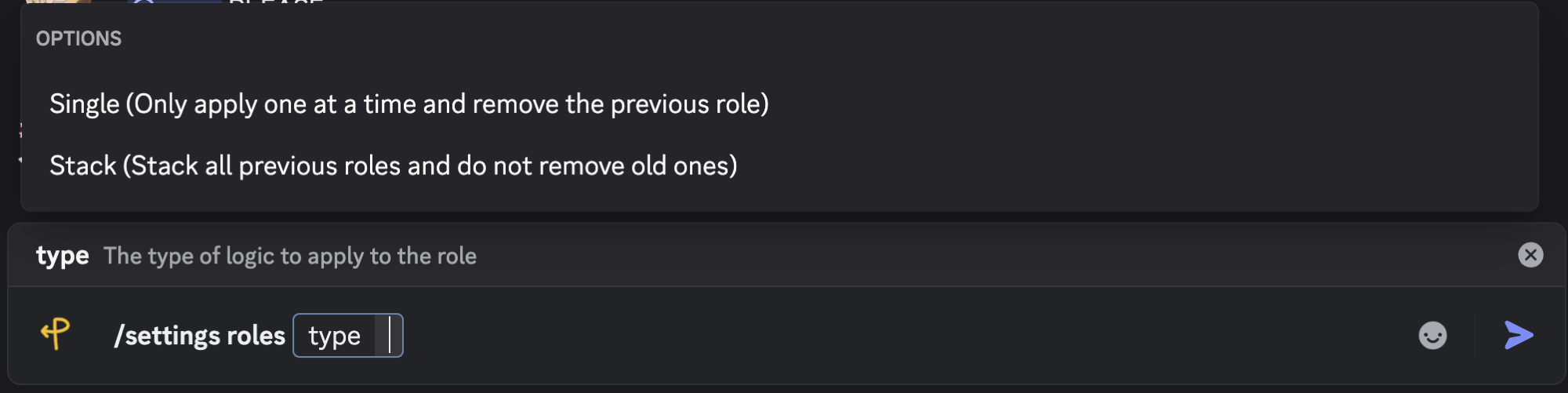
Set the mode with /settings roles. The command spells out each choice: Single applies one role at a time and removes the previous one, while Stack keeps every role a member has passed.
Related
- How levelling works for the level curve.
/levelrolescommand reference for exact options.